Align Your Dish
Like a Pro.

The most advanced satellite signal meter for Enigma2 receivers. Now available on iOS and Android.

Not sure if your receiver is compatible? Check supported devices

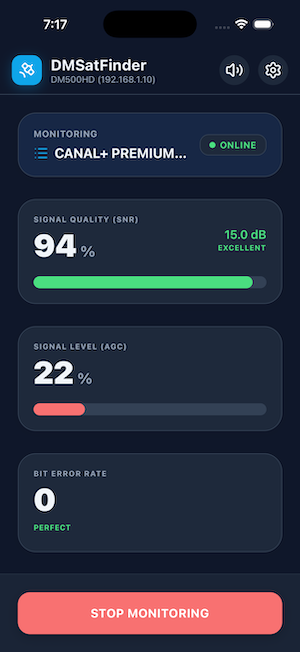
DMSatFinder App Screen

Powerful Features

Fast Signal Meter

Real-time signal strength and quality readings with ultra-low latency.

Audio Signal Indicator

Put your phone in your pocket and align the dish with both hands. Listen to the Beep or Variometer tone to find the perfect signal.

Channel Zapping

Standing on a ladder? No problem. Switch channels and bouquets directly from your phone to verify reception across different transponders.

No Cables Needed

Connects via Wi-Fi to your local network. No extra hardware required.

Smart Wakeup

Automatically wakes your receiver from standby when you start monitoring.

Multi-Language

Available in English, German, Polish, French, Italian, Spanish, Turkish, and Dutch.

Frequently Asked Questions

Will this app work with my receiver?

Yes, provided your receiver runs on Linux Enigma2 software. This includes legendary brands like Dreambox (the original inspiration for DMSatFinder!), as well as VU+, Zgemma, Octagon and GigaBlue. Standard cable or ISP boxes (like those from UPC, Sky, or Orange) are not supported as they are locked and do not allow external network communication.

Which software images (firmware) are supported?

DMSatFinder 2 is compatible with all major Enigma2 distributions that have the OpenWebIf or WebInterface plugin installed. This includes OpenATV, OpenPLi, VTi, BlackHole, EGAMI, OpenVIX, and Pure2. If you can access your tuner via a web browser on your computer, this app will work too.

How do I find my receiver’s IP address?

On most Enigma2 boxes, you can find the IP address by navigating to Menu -> Information -> Network or Menu -> Setup -> System -> Network -> Device Setup. It usually looks like 192.168.1.XX. Pro tip: Set a "Static IP" in your box settings so the app doesn't lose connection after a router restart.

Do I need a login and password?

By default, many modern Enigma2 images (like OpenATV 6.4+) require a password for web access. If you haven't set one, the app might not be able to connect. You can set a password in your box settings under Menu -> Setup -> System -> Network -> Password Setup. The default username is almost always root.

Can I use the app over 4G/5G/LTE?

For the best experience and verify zero audio latency, we recommend using the same Wi-Fi network as your receiver. While remote access is technically possible for advanced users, a local Wi-Fi connection is the only way to ensure the "Beep" sound is perfectly synchronized with your movements at the satellite dish.

The app is connected, but the signal is 0%. Why?

First, ensure your receiver is NOT in deep standby. Second, make sure you have selected a valid satellite channel in the app. If your box is currently recording or using the tuner for another task, it might not be able to provide signal data to the app (depending on how many tuners your box has).

Privacy Policy

Last Updated: February 2026

1. Introduction

DMSatFinder 2 ("we", "our", or "us") respects your privacy. This Privacy Policy explains our commitment to zero data collection while using our application.

2. Data Collection & Third Parties

We do not collect, store, or transmit any personal data.

DMSatFinder 2 does not use any third-party analytics, tracking tools, or advertising SDKs. No data is shared with third parties because no data is ever gathered by the app.

3. Local Network Communication

DMSatFinder 2 operates by connecting directly to your Enigma2 satellite receiver over your local Wi-Fi network. All communication happens strictly between your mobile device and your receiver. This connection is used exclusively to read signal parameters (SNR, AGC, BER) and switch channels.

4. Hardware Permissions

5. Children's Privacy

Our application does not collect any personal information and is safe for all users. We do not knowingly target or collect data from children under the age of 13.

6. Changes to This Policy

We may update our Privacy Policy from time to time. Any changes will be posted on this page with an updated "Last Updated" date.

7. Contact Us

If you have any questions, please contact us at: dmsatfinder@extraweb.pl